How to Track Multiple Trading Accounts in Real Time Without MT4/MT5 Alt-Tab Fatigue
Managing multiple prop firm challenges, funded accounts, and personal broker terminals usually means a chaotic routine of opening endless MetaTrader windows. Constantly using Alt-Tab just to check your current equity, floating profit and loss, and drawdown across different MT4 and MT5 platforms wastes valuable seconds when the market moves fast. One missed update can lead to an accidental rule breach and a failed evaluation.
DeckLive solves this by bringing all your accounts together onto a single, cloud-hosted dashboard. Designed specifically to track multiple trading accounts simultaneously, it streams live balance, equity, P&L, and drawdown updates every few seconds via WebSocket, keeping you fully in control of your entire trading operation from one screen.
Why not just use your prop firm's own dashboard?
- All your accounts on one screen, not one at a time
- Live updates every few seconds, not a manual refresh
- Telegram and email alerts before you breach a limit
- Each prop firm's rules (Daily DD, Max DD, Profit Target) pre-configured per account
The Challenge of Managing Multiple Prop Firm Accounts
Traders juggling multiple prop firm challenges and personal accounts face a severe logistical hurdle. Every firm uses separate MetaTrader instances, requiring individual logins, server selections, and window arrangements. Monitoring floating P&L and risk metrics across five or ten different terminals simultaneously is practically impossible with manual clicking.
This fragmentation increases operational stress and cognitive load. When you have capital spread across different brokers and evaluation phases, missing a sudden spike in drawdown on a single account can jeopardize weeks of trading progress. A centralized overview is no longer a luxury—it is a necessity for serious multi-account traders.
One Dashboard for MT4 and MT5 Accounts
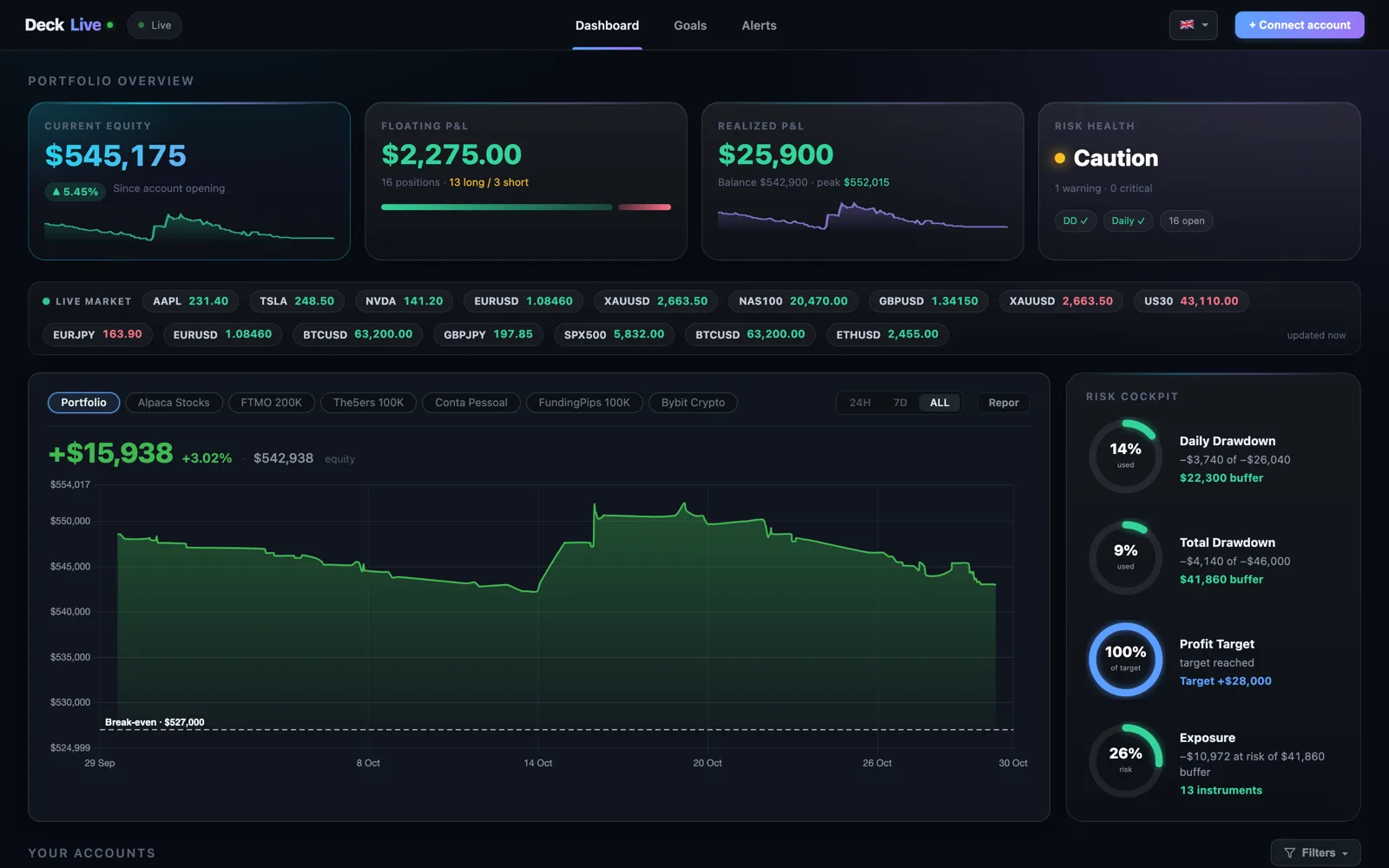
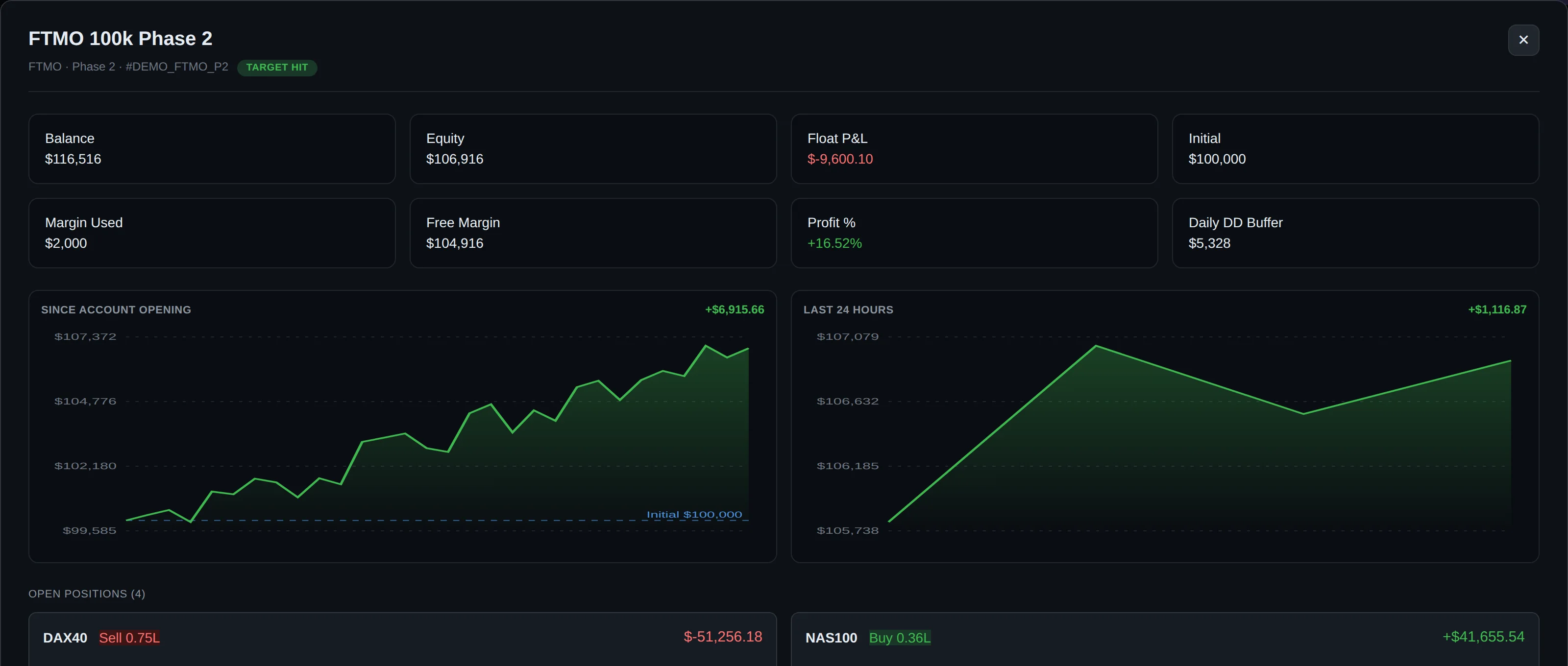
DeckLive provides a unified interface where you can track multiple trading accounts regardless of whether they are hosted on MT4 or MT5. Instead of scattering your attention across a crowded desktop, you see a clean, organized table displaying every account's critical metrics side by side.
The dashboard aggregates balance, equity, floating P&L, and current drawdown in real time. Because it updates every few seconds via WebSocket, you always have an accurate picture of your financial standing across your entire portfolio without needing to refresh or click between terminals.
Zero Installation and Secure Investor Access
Setting up traditional multi-account tools often requires complex software installations, Virtual Private Servers (VPS), or running custom Expert Advisors (EAs) on every single chart. DeckLive is entirely cloud-hosted, eliminating the need to install MT5 or configure local terminal bridges.
Connection is established securely using your broker investor password, which provides read-only access to your account data. This means DeckLive can monitor your positions and performance metrics safely without having any ability to execute trades, modify orders, or withdraw funds from your accounts.
Proactive Risk Alerts Before Breaching Rules
Prop firms enforce strict risk parameters, including Daily Drawdown limits, Maximum Total Drawdown thresholds, and specific Profit Targets. Losing track of these metrics during a volatile trading session can result in an immediate rule breach and account termination.
DeckLive pre-loads each prop firm's specific rules per account. The system actively monitors your drawdown and performance against these limits, sending instant Telegram and email alerts before a threshold is breached, giving you the chance to intervene and protect your funded status.
Multi-Language Support and Flexible Trial
Trading is a global activity, and having your risk management tools available in your preferred language improves clarity during high-pressure market conditions. The DeckLive user interface is fully available in English, Portuguese (PT/BR), and Spanish.
To let you experience the benefits of centralized monitoring firsthand, DeckLive offers a 7-day free trial supporting up to 3 accounts. As an independent platform, DeckLive maintains complete neutrality and is not affiliated with any prop firm or MetaQuotes.
Frequently asked questions
How does DeckLive connect to my MT4 and MT5 accounts?
DeckLive connects securely using your broker investor password, which provides read-only access. You do not need a VPS, local MT5 installation, or any Expert Advisors (EAs). Because the connection is read-only, DeckLive can track your data safely without having permission to execute or modify trades.
Can I track both prop firm accounts and personal broker accounts together?
Yes. DeckLive is built to track multiple trading accounts across different providers simultaneously. You can monitor your funded accounts, active prop firm challenges, and personal broker accounts on one unified screen.
How do the prop firm risk alerts work?
DeckLive pre-loads the specific rules for each prop firm—such as Daily Drawdown, Max Total Drawdown, and Profit Targets—into your account profile. The system monitors your live equity and drawdown metrics, sending Telegram and email alerts before a limit is breached.
How often does the dashboard update my account data?
Account metrics including balance, equity, floating P&L, and drawdown update every few seconds via WebSocket, ensuring you have near-instant visibility into your portfolio performance without manual refreshing.
Is there a free trial available?
Yes, DeckLive offers a 7-day free trial that allows you to connect up to 3 accounts and test the dashboard features, real-time WebSocket updates, and risk alerts.
Data sources
The rules and limits cited on this page come from the official rules published by each prop firm (FTMO, FundedNext, The5ers, Funding Pips, The Funded Trader, E8, Topstep, Apex) and from the MetaTrader 4 and 5 platform documentation. The equity, balance, P&L and drawdown values shown in DeckLive are read in real time directly from your MT4/MT5 account — they are not estimates.